Free AI Image Generator Agent - Wymagine AI
Start with an idea, a reference image, or a photo you want to edit. Refine the result with simple follow-up instructions until it looks the way you want.
- Free Generation
- High Quality
- Fast Generation
- Easy to Use
Featured AI Image Generation Models
 Nano Banana 2.1Realistic images with clearer text and consistent subjects
 GPT Image 2.5Sharper images, faster generation, and more precise editsNano Banana 2 LiteFast, cost-efficient image creation for rapid iteration
 Seedream 5.0 ProProfessional image creation with advanced reasoning and precise controlGPT Image 2Fast, high-quality image generation and editingNano Banana 2High-quality image generation with faster, more precise editsSeedream 5.0 LiteSmarter image creation with deeper prompt understanding and reasoningNano BananaFast image generation and conversational image editing
Create, Edit, and Refine with Wymagine’s AI Image Generator Agent
Generate readable text, refine individual details, explore styles, and use natural-language prompts or reference images to shape every result.
Search the Web as You Create
Ask for a real landmark, product, or event, or paste a link. The agent searches the web or reads the page first, so the details it draws are based on real sources.
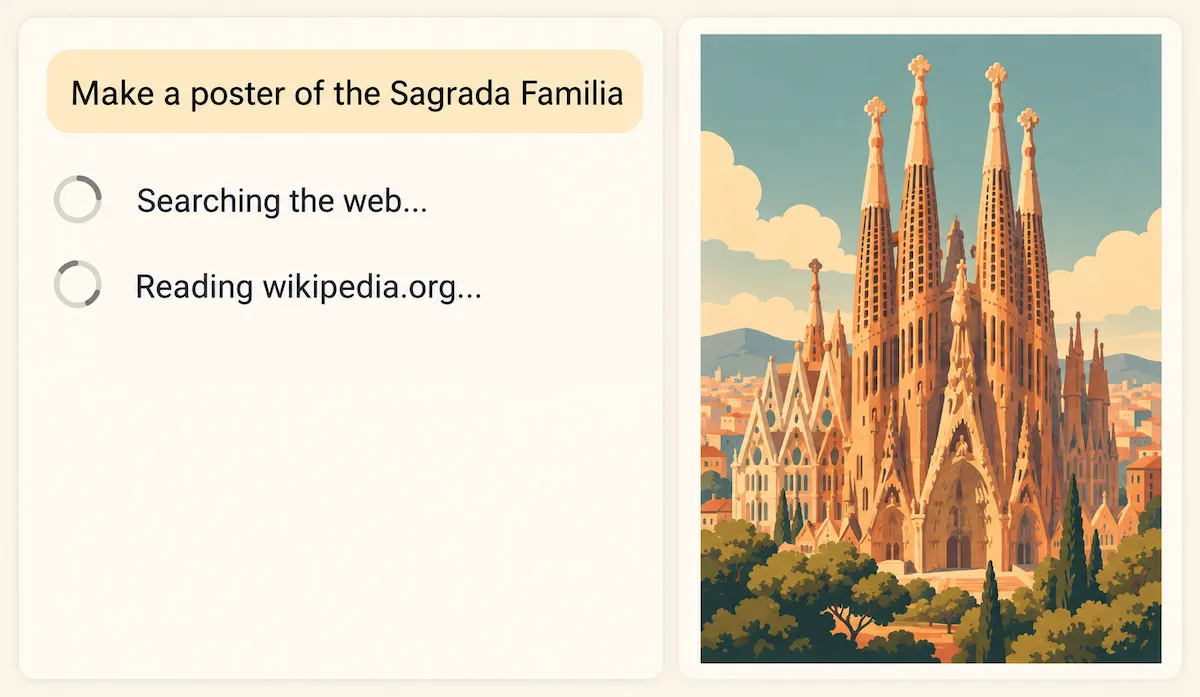
Text You Can Actually Read
Create AI images for posters, covers, and labels with clean, readable text that belongs in the image—not pasted on afterward.

Edit the Idea, Not the Entire Image
Tell the agent what to change and what to keep. Make focused edits without recreating the image from scratch.

A Style for Every Story
Explore photo, illustration, cinematic, and editorial looks with one AI image generator until the mood feels right.

Your References, Your Direction
Guide the AI image generator with reference images when color, composition, or visual character is easier to show than to describe.

One Spark, Many Possibilities
Start with one idea, choose the draft with the most potential, then guide the next revision from there.

Get inspired
Explore what you can create with Wymagine AI.
Use cases of Wymagine AI image generator
Use this online AI image generator to create visual concepts for characters, story scenes, social posts, covers, and product ideas. Start with a prompt, add a reference image when visual direction matters, then refine the version you want to use.

Visualize a character before you draw, write, or build
Use the AI image generator to describe the clothing, expression, setting, and style you have in mind. Add a reference when a particular look matters, then explore versions until the character feels right.

Turn notes into scenes and mood boards
Bring a setting, key moment, or line from your notes into view with AI image generation. Compare visual directions for light, mood, and composition before committing to one.

Create shareable artwork in the format you need
Make AI images for a playlist cover, reading-list visual, social post, or poster concept. Choose an aspect ratio, then use plain-language prompts to shape the image around your idea.

Explore product imagery before a photo shoot or launch
Pair a product reference with a description of the setting, palette, or mood. Use the AI image generator to create lifestyle-scene and campaign concepts before choosing a visual direction.
How to use the AI image generator agent
Go from a text prompt to a polished AI-generated image with this text-to-image generator in three straightforward steps.
Start with your idea
Describe the subject, style, lighting, composition, and mood you want to create. The more specific your AI image prompt, the closer the result can be.
Review the first draft
Check the composition, style, text, and details to decide what should change and what should stay.
Guide the next revision
Use focused follow-up instructions to refine the result without starting your idea over.
Choose Your Plan
Free images include a watermark. Upgrade for watermark-free, high-quality downloads, faster generation, and commercial use.
Starter
50% Off
$9
$19
/month
Billed annually, $228$108/year
800 Credits/mo for generation
Up to 400 images/month
Access to premium AI models
High quality images
Faster generation
Private generation
No watermarks
Commercial use license
Pro
50% Off
$19
$39
/month
Billed annually, $468$228/year
2,000 Credits/mo for generation
Up to 1000 images/month
Access to premium AI models
High quality images
Faster generation
Private generation
No watermarks
Commercial use license
Early access to advanced AI features
Max
50% Off
$39
$79
/month
Billed annually, $948$468/year
4,500 Credits/mo for generation
Up to 2250 images/month
Access to premium AI models
High quality images
Faster generation
Private generation
No watermarks
Commercial use license
Lowest cost per credit
Early access to advanced AI features
AI Image Generator Agent FAQ
Wymagine’s AI image generator agent helps you create and refine images from a prompt or reference image. Start with a first draft, then give focused instructions for what to change and what to keep.
Start with a prompt or reference image and review the first draft. Then continue in the same chat with focused instructions—for example, ask to keep the composition while changing the lighting, background, style, or on-image text.
Start with the main subject, then add the details that matter most: the setting or composition, visual style, lighting, colors, and mood. For example, instead of “a coffee shop,” try “a quiet corner coffee shop at golden hour, warm wood, soft film grain, editorial photography.” Change one detail at a time when refining to see how it changes the AI image.
Yes. Upload a reference image alongside your prompt to communicate a composition, color palette, visual character, or overall style that is easier to show than describe. Explain in your prompt what to keep or change; the AI image generator uses the reference to guide a new image rather than produce an exact copy.
Choose an aspect ratio that fits where the image will appear—for example, square for a profile image or feed post, portrait for a story, and landscape for a cover or banner. Select a model based on the type of result you want, then use the available resolution and quality options when you need more detail. Wymagine's AI image generator shows the credit cost for your selected settings before you generate.
AI image generation is iterative: the same idea can be interpreted in different ways. Make the important parts of your prompt more specific, such as the subject, camera angle, lighting, or style. If a result gets close, use it as a reference and clearly describe the one change you want next.
Yes. This AI image generator can create posters, covers, labels, and other graphics with text in the image. Put the exact wording in quotation marks in your prompt and keep it short for the best chance of a clear result. Review spelling and legibility before using the image in a finished design.
You can start creating with free image-generation credits. Each generation or edit uses credits, and the cost varies by the model and settings you select. Free images include a watermark; paid plans and Credit Packs add benefits such as watermark-free downloads, faster generation, and higher-quality options.
Images generated with an active paid subscription or Credit Pack Member benefit may be used commercially, subject to Wymagine's Terms of Use and applicable laws. You are responsible for making sure your prompts, reference images, and final use do not infringe another person's rights.
Yes. Sign in before generating so you can use your image-generation credits and manage your results in one place.
Start creating with your AI image agent.
Describe a visual or upload a reference image, then refine the result with focused follow-up instructions.